Giving Data a Name
The first program printed a sentence that was always the same. An interesting program, however, receives data, keeps it for as long as needed, and produces a result. Let us start with three grades: 24, 27, and 30. Before deciding how to calculate their average, we need to understand what a variable, a type, and an expression are. These may seem like small bricks, but an error here spreads into almost all the code to come.
An expression is evaluated and produces a value, such as firstGrade + secondGrade. A statement is an executable unit of the program: int sum = firstGrade + secondGrade; is a declaration with initialization. Not all statements end with ;: a block delimited by { and } and an if have a different structure. Nor is it true that an expression cannot have effects: a method call can produce a value and, at the same time, modify state. We will distinguish results from effects when reading the code.
Java distinguishes primitive types and reference types. The primitives include boolean, the integer types byte, short, int, long, and char, and the floating-point types float and double. A primitive-type variable contains a value of that type; a reference-type variable contains a reference to an object or null. An array is an object, so int[] is also a reference type, even though its elements are primitive integers. This distinction is described by the Java 25 type specification.
The specification calls the special type of the expression null the null type: we do not name it in a declaration as we would with String, but can assign that value to a reference-type variable. null does not indicate an empty object; it indicates that the reference does not designate an object. If we then try to call a method through it, the problem appears after execution has started. void answers yet another question: in a method signature it indicates that the method does not return a value usable by the caller. It is not a ninth primitive type to choose for a variable.
Definition – Type and Variable. The type establishes which values and operations are permitted. A variable is a name associated with a location that can contain a value compatible with that type. The programmer's chosen name does not change the meaning of operations, but can make it much clearer to readers.
The primitive-type table clarifies two common misunderstandings: the language does not fix boolean's memory size at one bit, and void is not a variable type. Integer sizes and floating-point formats are defined by the specification, independently of the operating system.
| Type | Values or range | When we will encounter it |
|---|---|---|
boolean |
true or false |
Conditions in if and loops; it is not a number. |
byte |
−128 to 127, 8-bit signed integer | Binary data and APIs that work with bytes. |
short |
−32,768 to 32,767, 16-bit signed integer | Some formats and APIs; for small counters, int often remains simpler. |
int |
−2,147,483,648 to 2,147,483,647, 32-bit signed integer | Indexes, counts, and ordinary integer calculations. |
long |
−9,223,372,036,854,775,808 to 9,223,372,036,854,775,807, 64-bit signed integer | Counts that may exceed the range of int. |
char |
\u0000 to \uffff, 16-bit unsigned UTF-16 unit |
Processing code units, rather than every visible symbol. |
float |
Numbers in the 32-bit IEEE 754 binary format | Numerical data that accepts this precision. |
double |
Numbers in the 64-bit IEEE 754 binary format | Calculations with fractions where approximate representation is appropriate. |
Read the table as a choice of meaning, rather than a competition to use the smallest type. If a counter reaches at most one hundred, a byte could contain the value, but many arithmetic operations on byte produce an int: the code would require conversions that do not help us understand the problem. int is often the simplest choice. If, instead, you are reading a binary format that defines exactly one byte, that type says something about the format. With long, remember the L suffix for a literal outside the range of int; without the suffix, writing an oversized number does not automatically become a valid long declaration.
The table assigns no size to boolean, because the language defines its two values, rather than a universal one-bit memory footprint. Nor does it place void among the values a variable can contain: void belongs to the declaration of a method that returns no result. A type’s size and the meaning of a declaration therefore answer different questions. If you need to know how much memory a particular structure occupies in a concrete JVM, do not derive the figure from the type table alone: object representation, alignment, and implementation also matter.
Let us try reading some concrete values before writing more declarations. 127 fits in a byte, but 128 does not; 32_767 fits in a short, but 32_768 does not. The limit concerns the type's range, rather than the number of digits we see on the screen. Writing 3_000_000_000L indicates a long: the final letter is part of the Java literal, while underscores visually separate groups of digits without changing the value. The form 3.0, instead, indicates a floating-point value of type double. Although mathematically representing an integer, it cannot be assigned directly to an int variable: Java does not decide by itself to discard any fractional part.
For float and double, the question is not only “what is the maximum value?” Precision is finite: between two consecutive representable numbers there are other real numbers the computer must approximate. If you write 0.1 + 0.2, you cannot assume that an exact comparison with 0.3 will be true. This does not make floating-point types useless; it makes them appropriate for problems permitting a controlled rounding error. Counting the cents on an invoice, instead, requires a different model, for example an integer number of cents or BigDecimal with explicit rounding rules. We will not use these alternatives as shortcuts before understanding the problem they solve.
Further reading – Size and Meaning. Signed integers follow ranges fixed by the language.
charis different: its 16 bits represent an unsigned UTF-16 unit.booleanrepresents a choice between two logical values; the specification does not turn it into an integer on which to perform addition. Three types may therefore all require some form of storage, yet offer very different operations and meanings.
Some Syntax Rules
A simple declaration such as int grade = 24; contains the type, name, initial value, and a semicolon ending the statement. Braces delimit blocks; parentheses enclose arguments and conditions, among other things. Java distinguishes uppercase from lowercase: grade and Grade are two different names. Do not choose names differing only in one uppercase letter; the compiler would accept them, but readers would have to look twice.
Names can contain Unicode letters and other characters permitted by the specification, but in the examples we will use simple English names without accents to avoid difficulties with reading and tools. Language keywords such as class and int cannot become variable names. Parentheses and semicolons are not ornaments: changing one can change the program's structure or prevent compilation.
Indentation does not normally change the grammar of a Java block: braces delimit it. However, it remains essential for a person reading. A program written entirely on one line can compile and be almost impossible to verify. A small practical exception concerns the text of some literals and comments, where spaces are part of the content: “spaces do not matter” is therefore a simplification to use cautiously.
To build the syntax, we can start from three schematic rules and arrive at an if inside another if. The point is that a block can contain statements, including another block or a decision. For example, when we first check whether a grade is valid and then whether it is a passing grade, the second question makes sense only inside the first branch:
int grade = 24;
if (grade >= 0 && grade <= 30) {
    if (grade >= 18) {
        System.out.println("Exam passed");
    }
}
Starting at the first brace, the compiler encounters a second if statement and then the block containing the print statement. The two closing braces end the inner block first, then the outer block. If the grade is -1, we never even reach the question about passing; if it is 17, we enter the outer block but not the inner one. This step-by-step reading preserves the historical example's function without presenting three formulas that do not describe all Java statements as a complete grammar.
A semicolon after a simple assignment ends that statement; a semicolon placed immediately after if (grade >= 18), instead, would construct an empty statement. The following block would no longer be the conditional branch, even if indentation made it seem so. Braces are a small expenditure of characters that avoids a major misunderstanding. In the next chapter we will return to if, else, and nesting; here we want to see how blocks, expressions, and statements really fit together.
Good practice – A Name Tells the Purpose.
gradeSumis more useful thanxwhen the value serves to calculate an average. A short name such asican be appropriate for a local index whose meaning is visible within two lines; outside that context it requires too many assumptions.
Declaration, Initialization, and Scope
A local variable is declared inside a method or block. Before reading it, a value must have been assigned along every possible path to that point. This check is called definite assignment: the compiler prevents a local variable from being used when it might not be initialized. An object's fields follow different rules and receive default initial values; do not exploit this difference to conceal a forgotten initialization.
We can declare several variables of the same type in the same statement, such as int first = 24, second = 27;. This is legal syntax, but two separate lines become easier to modify if the values acquire different meanings. The declaration introduces a name; the assignment first = 25; replaces the value that name contains. In mathematics, = asserts equality; here it indicates an action. That is why first = first + 1; makes sense in Java: the old value is read, the new one calculated, and stored in the same variable.
A declaration placed inside the inner braces is unavailable after they close. If we declared int sum = 51; only in the previous example's inner block, printing sum in the outer block would not compile. If we also used uninitialized variables, we would introduce two faults into the same fragment. To isolate the rule, we initialize the data and move the declaration of sum into the block that must read it. Do not confuse the name's visibility with physical memory: the JVM is not obliged to represent each local variable as a stationary slot on the stack, and an object can outlive the scope of the local name that created it.
To see the difference, imagine int total; inside main. The declaration introduces the name and type, but reading total before an assignment produces a compilation error. If, instead, you create new int[3], the three array elements already exist and initially equal 0. An int field in a new object also receives the default value 0; a reference-type field starts at null, and a boolean field at false. This does not mean that 0, false, or null are always meaningful values for the model. A Loan class, for example, should not consider a missing date valid simply because the reference field was automatically initialized to null. The language's rule and the problem's rule remain two distinct things.
int firstGrade = 24;
int secondGrade = 27;
int gradeSum = firstGrade + secondGrade;
Scope tells us at which points in the source a name can be used. A block's braces often delimit a local variable's scope. Scope does not mean object lifetime: an object created in a block can remain reachable after the block ends if a reference has been retained elsewhere. For now, the practical rule is simple: declare a variable near where it is needed and do not unnecessarily widen the area in which it can be modified.
The Declared Type and var
In some local declarations the compiler can derive the type from the initial value. Writing var sum = 24 + 27; does not create a “typeless” variable and does not allow it to turn into a string later: the inferred type is int. The name var is used only in the positions provided for local inference, rather than in place of a field's type or an ordinary parameter's type.
Important note –
varIs Not a Dynamic Type. Aftervar number = 3;, an assignment such asnumber = "three";does not compile. Use inference when the type remains obvious from the context; write the type in full when it helps readers understand the data's meaning.
final and the Word “Constant”
A variable declared final can receive a value only once. This is useful when reassignment would be an error:
final int gradeCount = 3;
If the value is a reference to a mutable object, final blocks reassignment of the reference, rather than modifications to the object. final int[] grades = {24, 27, 30}; prevents grades from pointing to another array, but permits grades[0] = 25;. To speak of immutability, we must also check the state accessible through the reference. We will return to this when designing classes.
The problem emerges when we pass the array to a method that should only calculate an average. Writing final before the parameter prevents the method from assigning another array to it; it does not prevent it from executing grades[0] = 0. If the caller expects the three grades to remain unchanged, there must be a contract respected by the method or a defensive copy of the data at the appropriate boundary. We can verify it with a small variation: after the call, print grades[0] and check whether it is still 24. A word in the declaration does not replace this experiment.
Transferring the Brick. When you encounter an unmodifiable list in the collections chapter, ask again what cannot be modified: the variable containing the reference, the list's structure, or the objects it contains. These are three distinct promises.
finalanswers only the first; the collection type and the elements' contract answer the others.
Numbers, Characters, and Text
int is a natural choice for small counters and integer values; long is useful when a wider range is required. For numbers with fractions, we will often use double. However, the fact that a value can be written with a decimal point does not mean every decimal number is exactly representable in binary: monetary calculations or delicate numerical comparisons require specific choices, which we will discuss later. boolean contains true or false and represents a condition.
The char type deserves a pause. It does not always correspond to a “character” in the sense of a symbol a person sees on the screen: it represents a 16-bit UTF-16 code unit. Some Unicode characters require two code units, and a visible sequence may contain several code points. To manipulate ordinary text, we will use String; when we need to count or transform code points, we will say so explicitly.
In Java literals, some sequences start with a backslash and represent characters we cannot conveniently write as ordinary text. \n is a newline, \t a tab, \\ a backslash, and \" a double quotation mark inside a string. A char literal uses single quotation marks, such as 'A', whereas a String uses double quotation marks, such as "A". The Unicode notation \uXXXX requires four hexadecimal digits and has its own processing rules; it must not be confused with any sequence preceded by \.
Further reading – One Measurement Can Answer Different Questions. A
String's length counts UTF-16 code units. The number of code points and of symbols perceived by readers can differ. That is why “this string has five characters” is ambiguous until we say what we are counting.
Literals can be made more readable: 1_000_000 is the same integer as 1000000; 0b1010 uses base two; 0xFF base sixteen. The L suffix makes a long value explicit, for example 3_000_000_000L; the F suffix identifies a float literal. These forms do not change the mathematical value, but help express the context.
Different bases are ways of writing the same kind of value. 10, 0b1010, and 0xA all indicate the integer ten. The binary form shows which bits are active, hexadecimal compacts groups of four bits, and decimal remains most convenient for an ordinary quantity. In a protocol assigning a meaning to each bit, 0b1010 tells us more than 10; for the number of students in a class, the opposite would happen. Underscores can separate groups, but cannot be placed arbitrarily beside the base prefix or decimal point: always try a new literal in the compiler before adopting it in many examples.
For text, 'A' and "A" are not interchangeable: the former is a char value, the latter a String object. Even "", the empty string, differs from null: the former exists and has length zero, whereas the latter indicates a missing reference to a string. This distinction will become important when comparing or concatenating values. If we write "Grade: " + 24, the + operator produces a string; 24 + 3, instead, is numeric addition. Moving parentheses is enough to change the result: "Sum: " + (24 + 3) prints Sum: 27, whereas "Sum: " + 24 + 3 prints Sum: 243. Java evaluates the two concatenations determined by the expression's structure from left to right.
Operators and Conversions
The = operator assigns a value, whereas == compares two values. += combines an operation with assignment, for example sum += grade;. The most common arithmetic operators are +, -, *, /, and %. With two integers, / produces integer division: 5 / 2 equals 2; 5 % 2 equals 1, the remainder. To obtain a result with a fraction, at least one operand must be converted to a floating-point type, as we will see in the average example.
The order of operations matters. In 3 + 4 * 2, multiplication precedes addition and the result is 11; in (3 + 4) * 2, parentheses cause the sum to be calculated first, giving 14. A precedence table can help, but we should first learn to recognize expressions and use parentheses when the intention is not immediate. The complete normative table remains in the Java 25 expression specification.
To avoid reducing that table to a reference, let us read the most common families in the order we need them. Parentheses make grouping explicit; unary +, -, !, and ~ apply to one operand; *, /, and % precede binary + and -. Numeric comparisons such as < precede equality comparisons such as ==; && precedes ||; assignment comes after calculating the right-hand side. There is no need to memorize a long row of symbols before doing the first exercise. If two different operators coexist on the same line and their order is not obvious, parentheses reduce the reader's effort without changing the program's intention.
Associativity answers a different question from precedence: what happens when two operators at the same level appear together? 20 - 5 - 3 groups as (20 - 5) - 3 and equals 12, rather than 18. The expression a = b = 5, instead, first assigns 5 to b, then the assignment's value to a. It is legal, but in an introductory explanation two separate statements make it easier to see which variables change. Grammatical priority does not replace evaluation order either: Java evaluates operands according to precise rules, and a method called inside an expression might have effects. That is why it is better not to hide several state changes in a single arithmetic line.
Integer division must be observed together with the remainder. 7 / 3 equals 2 and 7 % 3 equals 1, because 7 can be written as 3 * 2 + 1. -7 / 3 equals -2, since integer division truncates toward zero; -7 % 3 equals -1. Therefore, do not assume that % 2 always returns 0 or 1 if the operand can be negative. With an integer divisor equal to zero, / and % throw ArithmeticException during execution when the expression is reached. An average must check that the number of elements is not zero before dividing, as we will do in the next chapter's example.
Java applies numeric conversions in various contexts. In long large = 3;, the int value can be widened to long. The opposite direction may lose information and requires an explicit conversion, called a cast: int small = (int) large;. A cast is not a promise that the value fits in the range. If conversion narrows too much, the result may be surprising; before using it, check what information you are accepting to lose. The conversion specification distinguishes contexts and precise rules.
Consider a numerical example with a result we can predict. Long.MAX_VALUE equals 9_223_372_036_854_775_807; casting to int retains only the portion representable according to the language's rules and produces -1. Conversely, assigning Integer.MAX_VALUE to a long loses no information: 2_147_483_647 fits in the wider type's range. Even char letter = 'A'; int code = letter; is a numeric conversion: in this case, code equals 65. The word code here denotes the UTF-16 unit of A, which coincides with its Unicode code point.
long large = Long.MAX_VALUE;
int narrowed = (int) large;        // -1
long widened = Integer.MAX_VALUE; // 2147483647
int code = 'A';                   // 65
The fragment shows three operations, but is not a complete program. In the chapter materials, NumericConversions.java also contains the main method and prints the values, so you can check the prediction without relying on the explanation alone.
Important note – Addition Can Change Type. An arithmetic operation on
byteorshortis normally promoted at least toint. Therefore,byte a = 1; byte b = 2; byte c = a + b;does not compile, even though the mathematical result is small. The compiler looks at the expression's type, rather than only the value we expect in this case.
Let us calculate 1_500 * 1_000_000_000. If we declare both operands as int, the product is calculated as int and exceeds its limit: assigning it to a long afterwards does not repair the value already calculated. If at least one operand is long, numeric promotion makes the product a long before the operation:
int quantity = 1_500;
int priceInCents = 1_000_000_000;
long incorrect = quantity * priceInCents;
long correct = (long) quantity * priceInCents;
The name incorrect expresses the error relative to the expected mathematical quantity, rather than a syntax error: both statements compile. correct equals 1_500_000_000_000L; casting the left operand suffices for multiplication to occur in long. In a real program, we would also ask whether a long is wide enough for all expected data. Ordinary integer overflow does not automatically throw an exception; if exceeding the limit must be a recognizable error, the Math.multiplyExact and Math.addExact APIs can report it.
A conversion that widens an integer, such as from int to long, preserves its value. Not every conversion to an apparently “larger” type preserves every detail: a very large long converted to double can lose less significant digits, because floating-point formats have finite precision. A conversion that narrows, such as from long to int, normally requires a cast and may lose part of the value. Finally, an integer literal constant can be assigned to byte, short, or char if its value fits in the range: byte small = 100; compiles, whereas byte tooLarge = 128; does not. The sum of two byte variables nevertheless remains an int expression; do not extend the constant rule to any result.
Key concept – The Expression's Type Comes Before Its Destination. In
long result = a * b;, the final variable's type does not retroactively decide how to multiplyaandb. Observe the operands, identify the promotion applied, and only then ask whether the result can be assigned. This is the same method we will use for an array's average.
The comparison operators <, <=, >, >=, ==, and != produce a boolean. && and || combine conditions and evaluate the second operand only when necessary; ! negates a condition. The & and | operators can also act on integer values bit by bit; used with boolean values, they evaluate both operands. The shifts <<, >>, and >>> work on integers' bits: they are useful tools in protocols and binary formats, but do not automatically improve an ordinary calculation. The list of operators in the specification is the source for precedence and complete semantics.
The following small table lets us check combinations of the two boolean values. && is true only when both are true; || is true when at least one is true; ^ is true when the two values differ. Unary ! reverses a single value: !true equals false.
a |
b |
a && b |
a \|\| b |
a ^ b |
|---|---|---|---|---|
true |
true |
true |
true |
false |
true |
false |
false |
true |
true |
false |
true |
false |
true |
true |
false |
false |
false |
false |
false |
The effect of && and || is called short-circuit evaluation. If text != null is false, in text != null && !text.isEmpty() Java does not evaluate the right-hand side. This avoids calling isEmpty() through a null reference. The advantage is not only speed: the order of conditions expresses a logical dependency. Changing it can make the program fail.
This rule also applies to ||, but for the opposite reason: if the left-hand side is already true, there is no need to check the right. In authorized || validCode(), the validCode() method is not called when authorized is true. If the method has effects, for example recording an attempt, those two || characters also change the program's observable behavior. The boolean & and | operators, instead, evaluate both sides. Do not choose them to force a side-effecting call to execute: separating the call from the decision makes the intention clearer.
Compound assignment operators deserve their own reading. total += grade adds grade to the total and stores the result in the same variable; -=, *=, /=, and %= follow the operation indicated by the first symbol. There are also &=, |=, ^=, <<=, >>=, and >>>=, useful when the state really is a bitmask. >>>= shifts bits right without propagating the sign; a <<< operator does not exist in Java. Writing x += y resembles x = x + y, but the specification includes an implicit conversion to the type of the variable on the left. For example, after byte small = 1;, small += 2; compiles, whereas small = small + 2; requires an explicit conversion. The short form can therefore conceal a loss of information: if the range matters, check the result instead of trusting brevity.
The conditional operator condition ? valueIfTrue : valueIfFalse selects one of two expressions. String outcome = grade >= 18 ? "passed" : "to retake"; is readable because both branches produce a simple value. When each branch requires several statements or a comment explaining why it exists, the next chapter's if and else offer more room for reasoning. Do not confuse a compact form with an automatically better choice.
With boolean values, ^ equals true when exactly one of the two operands is true. With integers, instead, &, |, ^, and ~ act bit by bit. For example, 100 & 125 equals 100, whereas 100 ^ 125 equals 25. ~100 equals -101 because the operator inverts every bit of the signed integer, rather than only the ones we choose to write on paper. Operand and result must remain consistent: ~125 would equal -126, not -101.
Shifts require a similar distinction. 100 << 1 equals 200; 100 >> 1 equals 50. For negative numbers and overflow cases, treating a shift as ordinary multiplication or division gives incorrect results. >> propagates the sign bit, whereas >>> inserts zeros on the left. Use these operators when expressing an operation on bits; do not automatically replace * 2 or / 2 in the hope of making the program faster. The compiler and JVM can already optimize simple operations, and measurement on a real case is the only evidence of an advantage.
Let us examine the ProductDivision program, because observing a sequence teaches more than a single equality. Starting from 100, three right shifts give 50, 25, and 12; returning to 100, three left shifts give 200, 400, and 800. The transition from 25 to 12 immediately shows that we are not dividing real numbers: the integer discards the fractional part. In binary, using the eight least significant bits, 100 is written 01100100; a right shift takes it to 00110010, or 50. However, a Java int's representation has 32 bits: the eight-bit group serves only to see the transition, rather than representing the entire value in memory.
The behavior of negative numbers makes the difference between the two right shifts visible. -8 >> 1 equals -4, whereas -8 >>> 1 equals 2_147_483_644 for an int: in the second case, zeros enter from the left and the sign is not preserved. >>> shifts right without sign extension; calling it an “unsigned left shift” would reverse the operation’s direction. The number of positions must also be interpreted according to the left operand's type: for an int, Java uses only the distance's five least significant bits. Therefore, 1 << 32 has the same result as 1 << 0, namely 1; it does not produce zero or shift a bit beyond the word. This is a detail to know when reading binary protocols, rather than a trick to insert into ordinary calculations.
To check &, |, and ^ without confusing decimal digits with bits, align two values across eight positions: 100 is 01100100, and 125 is 01111101. Where both have a 1, & retains that bit, and we obtain 01100100, or 100. | retains each position where at least one operand has 1, giving 01111101, or 125. ^ retains differing positions and produces 00011001, or 25. The complement ~100, instead, inverts all 32 bits of the int; reading only the final eight would lead to the erroneous conclusion that the result is 155. The complete value is -101. These results are collected in the reproducible program BitsStepByStep.java, which accompanies the explanation without turning shifts into a performance recommendation.
Important note – Uppercase and Bitmasks. Turning lowercase letters into uppercase by clearing a bit is a shortcut with a precise limitation. This works only for a precise subset of Latin letters and can unexpectedly change other characters. For text, use the
CharacterorStringAPIs with an explicit language choice where needed. Bitmasks remain a good example for protocols and binary formats, where bits have a declared meaning.
The historical Uppercase example deserves an experiment, because its result for 'a' seems convincing. The code 97 & 223 produces 65, and these numbers correspond respectively to 'a' and 'A' in the basic Latin subset. But the same mask applied to a character other than an expected lowercase letter can change it without any linguistic reason. Furthermore, args[0].charAt(0) reads only the first UTF-16 unit of the first argument; with an absent argument it fails before showing a result. For one simple letter, Character.toUpperCase('a') makes the intention clear. For a word, a String transformation can be used with a Locale chosen according to the language and context. There is no universal subtraction of 32 that correctly transforms all Unicode: this is the technical correction, while reasoning about bits remains in the preceding paragraph.
Make a habit of separating three levels when an operation surprises you: representation, type, and meaning. Binary representation explains why 100 & 125 gives 100; the int type explains why ~100 involves thirty-two bits; the data's meaning decides whether the mask is a sensible solution. Applying a bitwise operator to a text code without a rule about the character repertoire skips the final level. The same reading method will be useful when working with arrays: an index is an integer, but the meaning of that position belongs to the problem we are modeling.
++ and -- also deserve attention. If int i = 0;, the expression i++ produces the old value and then increments i, whereas ++i increments first and produces the new value. When the expression is used alone as a statement, both take i to 1; the difference matters if the expression's value is assigned elsewhere. Prefer separating the steps if a line such as int j = i++ forces you to pause to understand the order.
Good practice – Parentheses When They Clarify. Operator precedence is defined by the language, but a person should not have to reconstruct it every time. Write
(sum / gradeCount) * 100when that sequence matters to the reasoning, and explain the result if the operands' types change the calculation.
Arrays: Several Values of the Same Type
Three separate variables suffice for three grades, but become awkward when there are thirty grades. An array collects a fixed number of elements of the same type and allows us to reach them through an index. The first element's index is 0; the last valid index is length - 1. In a length-three array, therefore, the indexes are 0, 1, and 2.
The form int[] grades emphasizes that the type is “array of integers.” Java also permits the historical form int grades[], inherited from other languages, but we will use the first in the examples. Declaring int[] grades; creates a reference variable, but not yet the array. grades = new int[3]; creates the array object and fixes its length. After creation, the length does not change; if you need a sequence that grows and shrinks, the collections chapter will show other structures.
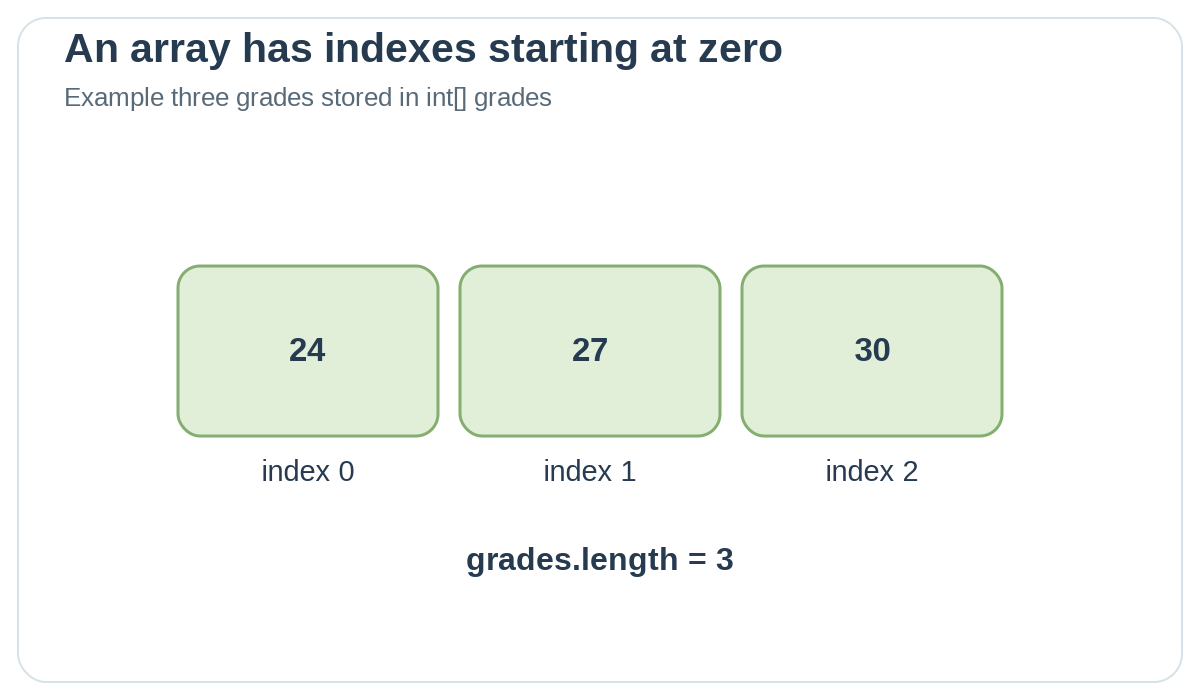
length equals three; trying to read grades[3] does not mean requesting the third element, but a nonexistent position.int[] grades = {24, 27, 30};
int first = grades[0];
int gradeCount = grades.length;
int[] is the array's type; braces provide the initial values. We can also create new int[3] and assign elements later, but then each position begins with the default value 0. If the index is outside the range, access fails during execution with ArrayIndexOutOfBoundsException. The compiler cannot always know the value an index will have when the program runs.
Let us take the reverse path from the compact declaration. After int[] grades = new int[3];, the program has a length-three array and the values 0, 0, and 0. The statement grades[1] = 27; changes the second position, rather than the twenty-seventh or the number of elements: the array becomes {0, 27, 0}. grades.length continues to equal 3. If we write grades[3] = 30;, the code compiles because the index is an integer, but fails during execution: the only valid positions are 0, 1, and 2. This is not a JVM error to ignore; it tells us that the program made an incorrect assumption about the boundary.
The length can also be zero. new int[0] creates a valid array containing no elements; there is no grades[0] to read. A general algorithm must therefore check the length before accessing the first element or dividing by the number of elements. This explains why the GradeAverage program below works with the three printed values, but is not yet the final version: the manually written sum assumes precisely three positions. In chapter 5 we will use a loop and explicitly handle the empty case.
Key concept – Length, Capacity, and Number of Meaningful Values. For a Java array,
lengthis the number of positions created and remains fixed. It does not say how many elements we have already filled with values useful to the problem. Anint[20]has twenty positions from the outset, initially all zero; if we have recorded three grades, we must separately retain the fact that only three positions represent actual grades. Later we will see structures that manage growth and element counts for us.
Here is a complete program using the array to calculate the average:
public class GradeAverage {
    public static void main(String[] args) {
        int[] grades = {24, 27, 30};
        int sum = grades[0] + grades[1] + grades[2];
        double average = (double) sum / grades.length;
        System.out.println("Average: " + average);
    }
}
The sum is 81, and the array's length is 3, so the output is Average: 27.0. The (double) cast converts sum's value before division; without it, Java would perform integer division and only afterwards convert the result to double. In the control-flow chapters we will replace the sum written element by element with a loop, so the program works for arrays of different lengths.
Arrays with Several Dimensions
In Java, a two-dimensional array is an array whose elements are themselves arrays. int[][] cells = new int[4][4]; creates four rows, each with four integers. To read a position, we write the row index first and then the column index, for example cells[1][2].
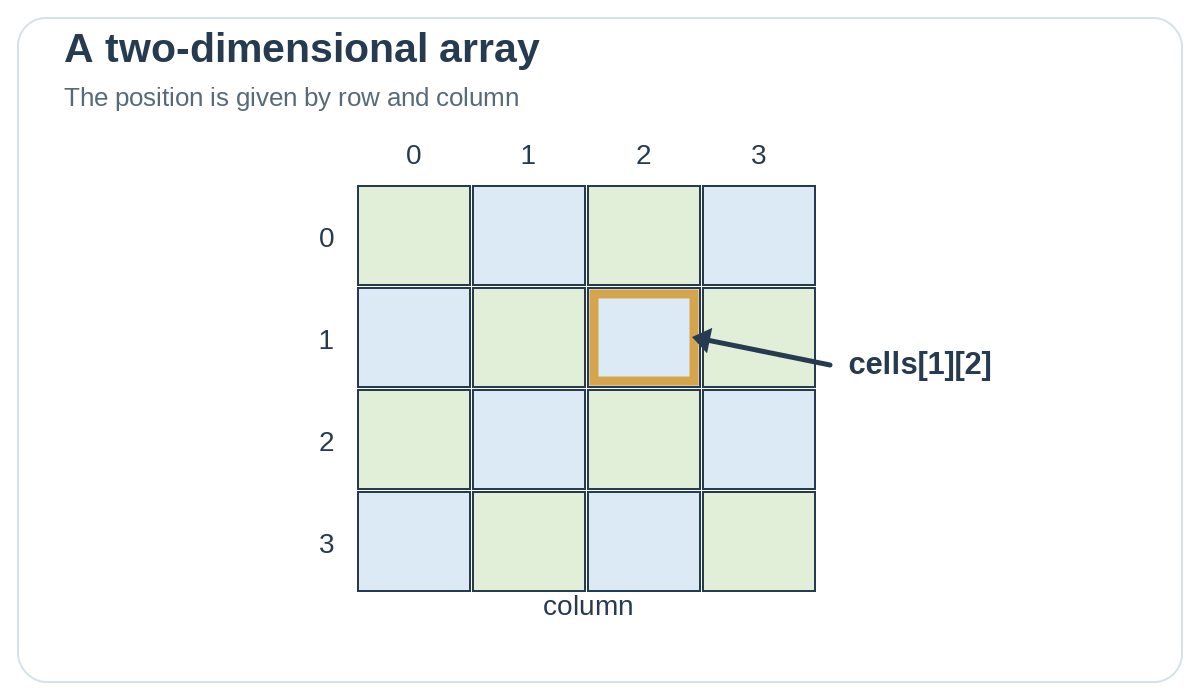
cells[1][2] is in the second row and third column. The figure shows a regular grid; Java also allows rows of different lengths.The draughts board makes the grid concrete; the figure highlights indexes, which are what we need to learn to use. An array of arrays can have rows of different lengths: that is why, in a general program, we check cells[row].length rather than assume each row is as long as the first.
Let us see what “array of arrays” means without immediately using the complete board. int[][] rows = new int[2][]; creates an outer array with two positions; each initially contains null, because it still needs to refer to an inner array. If we assign rows[0] = new int[3]; and rows[1] = new int[1];, the first row has three numbers and the second only one. Accessing rows[1][0] is valid, whereas rows[1][1] goes outside the second row even though rows[0][1] exists. A rectangular “matrix” is therefore our program's choice, rather than a constraint of the int[][] type.
Arrays are objects, and the variables naming them contain references. If after int[] first = {24, 27}; we write int[] second = first;, we have not copied the two grades: first and second designate the same array. second[0] = 30; will also make us read 30 through first[0]. When we want two independent arrays, we must request a copy, for example with first.clone() for this simple primitive array, and state why the copy is needed. This distinction prepares the ground for encapsulation: a class handing its mutable array to the outside also hands over the ability to alter its state.
An array can contain references rather than numbers. In String[] names = new String[2];, both positions start at null, rather than "". After names[0] = "Ada";, only the first position points to a string. Before calling names[1].length(), we need to assign text to it or explicitly handle absence; otherwise we encounter a NullPointerException. The initial-value rule we saw for fields and arrays also applies here, but the default value does not make the element ready for any operation.
Important note – Comparing Arrays.
first == secondchecks whether the two references point to the same array, rather than whether the elements are equal. To compare the contents of two one-dimensional arrays, we will usejava.util.Arrays.equals. The utility class also offersArrays.toString, useful for printing elements during an experiment: directly printing an array withSystem.out.println(first)does not list the grades as many beginners expect.
This chapter has introduced more than syntax. To tackle an array exercise, start with three questions: what data does each element represent, how many elements exist, and which indexes are valid? Only then choose whether to initialize all values immediately or fill them in subsequent steps. For a numerical exercise, add a fourth question: with which type does Java perform the calculation before assigning its result? These are simple questions to ask on paper and save random attempts when faced with an unexpected result. In the next chapter, we will use precisely these data to decide which statements to repeat and which to execute only under certain conditions.
To place the pieces on a draughts board, we will use an eight-row matrix. The figure isolates the index rule before the complete application. We can begin a board with String[][] draughts = new String[8][8]; and place a piece with draughts[0][1] = "white";. Cells we have not assigned initially contain null, rather than an empty string. To represent the entire initial arrangement, we will use a loop in the next chapter rather than copy dozens of assignments; thus we can verify that the same rule holds for every row. We will use one explicit, checked initial arrangement, so figure, code, and piece count describe the same board.
Checking Your Understanding
Try changing the grades to {20, 25, 28, 30}. Before starting the program, predict the average and indicate which line you must modify for the sum to include the new element. After running it, explain why we will use a loop in the next chapter. As a second experiment, write on paper the valid indexes for a zero-length array and a length-five array. The activity has succeeded when you distinguish value, index, and length and can explain the type of the expression used in division.