A Sequence That Can Choose
In the average program, we summed three elements by writing three additions. It works, but as soon as the number of grades changes, we must change the code. Furthermore, what should happen if the array is empty? To answer, we need statements that choose a path and statements that repeat work. This is control flow: deciding which part of the program to execute, how many times, and when to interrupt it.
A condition in Java must produce a boolean value, namely true or false. A nonzero number is not sufficient, as it is in other languages. Braces enclose a branch's statements. We will use them even when a branch contains a single statement: they help us see boundaries and make subsequent modification safer.
The previous chapter gave us operators for constructing conditions, but a boolean expression alone does not change the program's path. If we calculate grades.length == 0, we obtain true or false; it is the if statement that decides whether to execute the following block based on that value. This is an important step because it separates two questions often merged: “is the condition true?” and “what do I do if it is?” When a rule becomes complex, we can give it a meaningful name before using it in a branch; thus readers check the condition and action in two steps.
Statements can follow a sequential path, a selection, or a repetition. A sequence executes one statement after another. Selection with if or switch chooses between alternatives. Repetition with while, do–while, or for returns to a block as long as it makes sense. Finally, break, continue, and return change the path from inside these constructs or a method. These are not decorative categories: if you ask “do I want to choose a case, repeat work, or finish?”, you have already considerably narrowed the choice of syntax.
if, else, and Nested Decisions
The if statement executes a block only if the condition is true:
if (grades.length == 0) {
    System.out.println("No grades available");
}
If we want an alternative path, we add else. For example, a class can distinguish an empty array from one containing values. An if–else if chain permits several choices, evaluated in order. Once a branch is executed, subsequent ones are not considered. That is why the thresholds' order matters:
if (average >= 27) {
    assessment = "excellent";
} else if (average >= 18) {
    assessment = "passing";
} else {
    assessment = "to retake";
}
The first branch also includes values greater than 30; if the domain allows only grades from 0 to 30, that constraint must be checked where data enters the program. Conditions do not become correct because they seem plausible. In particular, reversing the first two branches would classify 29 as “passing,” because the second threshold would catch the value before reaching the first.
Try mentally following execution for average = 17, 18, 26, and 27. With 17, the first two comparisons are false and we reach the final branch. With 18, the first is false and the second true. With 26, the same happens, despite the higher number. With 27, the first comparison is true and the other branches are not even examined. This small exercise teaches more than reading three assessment labels: it shows that a condition chain has an order and interval boundaries must be tested. If you change >= 27 to > 27, the value 27 moves into the “passing” branch; one character has changed the rule.
When one decision contains another, indentation helps but does not replace braces. If there are many nested conditions, ask whether you are trying to represent a state that deserves its own name or a separate method. There is no magic number of permitted if statements: there is a practical limit to the number of cases a person can hold in mind while reading.
Which if Does else Belong To?
Nested if statements deserve attention because an apparently harmless line can change the result. Without braces, an else is associated with the nearest compatible if. Consider the grade 20: we first want to check that it belongs to the range from 0 to 30, then decide whether it is at least 18. If we write the two checks on separate lines but without blocks, indentation may make us believe the else means “invalid grade,” whereas it belongs to the passing check. Braces make visible the structure the compiler actually uses.
An if–else if chain does not automatically prove that cases are complete and non-overlapping. In our assessment of grades, average >= 27 also absorbs 31, while the final branch also absorbs -1. If both are prohibited, add a validity check before classification. This separates two questions: “does the data make sense?” and “which band does it fall into?” The separation helps write a test for every boundary: -1, 0, 17, 18, 26, 27, 30, 31.
Important note – Equality and Assignment. In a condition,
==compares values, whereas=assigns. The compiler catches many accidental swaps, but not every logical problem:boolean ready = true; if (ready = false) { ... }is syntactically possible and uses the assigned value as the condition. If the intention was comparison, the program is wrong.
switch: Choosing by Cases
When several branches depend on the same value, switch can express the choice more clearly. The classic form is a statement: it performs actions. A simple example uses a number to represent a weekday:
In the following fragments, we assume day is an int normally between 1 and 7; the out-of-range case will be handled explicitly. The fragments are parts of a method, whereas complete programs are shown in full or available in the chapter materials.
switch (day) {
    case 6, 7 -> System.out.println("Weekend");
    default -> System.out.println("Weekday");
}
case labels with -> do not automatically fall into the next case. The old colon form still exists and may be needed for code sharing statements between cases, but requires attention to fall-through: without an interruption, execution can continue into the next branch. In new examples, we will prefer arrows when they better express the intention.
In the classic form, case 6: marks the point at which to begin, rather than a closed enclosure. If the code prints “Saturday” and encounters no break, it can continue into the case 7: block and print “Sunday” too. Sometimes this is intended: several labels can share one action. Other times it is a hard-to-see defect, especially when a new case is added between existing ones. The arrow case 6, 7 -> ... directly expresses that both numbers receive the same response and that the branch does not continue into the next.
To make fall-through observable, imagine day = 6 and two classic branches. If case 6: prints Saturday and does not end with break, execution continues through case 7:'s statements and also prints Sunday: the compiler does not reevaluate the selector between prints. Inserting break after the first prevents the second from executing. A default placed at the bottom can itself be passed through by a preceding case that does not stop; its position does not create a barrier by itself. This was the difficult part of the second historical number-to-words program: every branch needed a correct break. With case number ->, each branch is separate by construction.
Constant labels in the classic form must be values accepted by the grammar and determinable at compile time. final String dog = "DOG"; can be used as a label in a switch on String; a mutable variable String cat = "CAT"; is not a compile-time constant, even if it currently always contains the same text in our examples. Variables declared inside a branch with case ... : require attention to the switch block's shared scope: local braces around the branch make visible where the name begins and ends. In the arrow form with a block, those braces are already the natural location for the branch's temporary data.
switch is not always preferable to if. If decisions depend on different conditions, such as grade >= 18 and attendance >= 10, a condition chain may be more natural. If, instead, you are choosing between distinct values of the same expression, switch makes the case list more evident. In both constructs, ask what happens for an unexpected value: a default printing “invalid value” is an explicit decision, rather than a patch to add mechanically.
Let us transform a number into its written form in two ways: first with an if and else if chain, then with a switch. Consider the value 3: in the chain, we first test whether it is 0, then 1, then 2, and finally reach the condition for 3. In the switch, instead, we declare a case for each expected value. The visible result, “three,” can be identical; what changes is how the source expresses the relationship between value and response. Do not infer from a teaching example's lines which form is always faster: here, choosing primarily depends on the rule's readability and the need to handle out-of-range values.
The permitted range is an essential part of the program’s contract. If conversion is defined only from 0 to 10, what should happen for -1 or 11? Leaving a string uninitialized or printing nothing would make the error hard to recognize. We can choose an explicit message, reject the data before selection, or represent the absence of a translation: what matters is declaring the choice. Numbers written in words also bring a small domain problem: Italian “uno” and “una” depend on context. An example called IntegerAsString must say whether it produces conventional labels or words suitable for a sentence. This does not change switch syntax, but reminds us that a program correct for the listed cases may still be incomplete for the real problem.
The two historical versions still deserve to be read in full, because they convey the weight of eleven alternatives better than an example with only two days. The following program preserves the same cases, zero through ten, and places them in two methods side by side. withIf tests conditions from top to bottom and returns text as soon as one is true. withSwitch presents the same values as labels of a single expression. In both cases, the final branch handles both negative numbers and those greater than ten: the old message mentioning only “greater” numbers did not describe the case -1.
public class IntegerAsStringCompared {
    private static String withIf(int number) {
        if (number == 0) {
            return "zero";
        } else if (number == 1) {
            return "one";
        } else if (number == 2) {
            return "two";
        } else if (number == 3) {
            return "three";
        } else if (number == 4) {
            return "four";
        } else if (number == 5) {
            return "five";
        } else if (number == 6) {
            return "six";
        } else if (number == 7) {
            return "seven";
        } else if (number == 8) {
            return "eight";
        } else if (number == 9) {
            return "nine";
        } else if (number == 10) {
            return "ten";
        } else {
            return "out of range";
        }
    }

    private static String withSwitch(int number) {
        return switch (number) {
            case 0 -> "zero";
            case 1 -> "one";
            case 2 -> "two";
            case 3 -> "three";
            case 4 -> "four";
            case 5 -> "five";
            case 6 -> "six";
            case 7 -> "seven";
            case 8 -> "eight";
            case 9 -> "nine";
            case 10 -> "ten";
            default -> "out of range";
        };
    }

    public static void main(String[] args) {
        if (args.length != 1) {
            System.out.println("Usage: java IntegerAsStringCompared <integer>");
            return;
        }
        int number = Integer.parseInt(args[0]);
        System.out.println("if: " + withIf(number));
        System.out.println("switch: " + withSwitch(number));
    }
}
Run IntegerAsStringCompared.java with java IntegerAsStringCompared 3: the printed lines are if: three and switch: three. Repeat with 0, 10, -1, and 11, then check that the two lines agree every time. Without arguments, the program shows the expected usage instead of attempting to read a nonexistent position in the args array. A nonnumeric string, however, causes NumberFormatException: handling genuinely interactive input would require another decision, which we will address in the exceptions chapter. Here we isolate the comparison between the two selections.
The comparison also shows that a more compact form does not remove the work of defining the domain. The eleven values remain eleven; switch avoids repeating number ==, but each label still requires the correct word. If tomorrow we include 11, we must update both versions and the boundary checks. Writing a table of expected cases before implementing it is a good defense against omissions and typos, whichever construct we choose.
A switch expression, instead, produces a value. This avoids initializing a variable in several places:
String dayType = switch (day) {
    case 6, 7 -> "weekend";
    case 1, 2, 3, 4, 5 -> "weekday";
    default -> "invalid value";
};
The expression must cover all possible values of the selected type; otherwise the compiler could not guarantee a result. Here, default handles numbers outside the expected range. If a branch needs several statements, a block and yield can deliver the expression's value; return would have a different meaning, because it would leave the method. The Java 25 statement and pattern specification describes both forms.
To see the difference, imagine a case that must first construct an explanation and then produce the final string. The branch can contain a block:
String description = switch (day) {
    case 6, 7 -> {
        String name = "rest";
        yield "day of " + name;
    }
    default -> "ordinary day";
};
yield delivers the branch's value to the switch expression; the description variable receives it. Do not use it in an ordinary if to “leave the block”: its role here is specific. In the example, the block is longer than actually needed; we show it only to read the syntax without adding other problems.
Key concept – A Value or an Effect. Use
switchas an expression when calculating a result to assign or return. Use it as a statement when each case must perform an action. Choose the form that makes the purpose evident; brevity alone is not enough.
Recognizing the Type with a Pattern
A modern form of switch can select a branch based on an object's type. Consider a value that may be text, an integer, or something else. This example is further reading because it uses objects and types we will study more slowly, but shows why a switch is no longer limited to a list of numbers:
The first step can be an instanceof check:
if (value instanceof String text) {
    System.out.println(text.length());
}
If value is a String, the text variable contains the already checked reference in the branch. There is no need to repeat a cast. The name is not available everywhere: the compiler determines its scope from paths where the check can be true. A pattern switch extends the same idea to several cases:
String description = switch (value) {
    case null -> "absent";
    case String text when text.isBlank() -> "empty text";
    case String text -> "text: " + text;
    case Integer number -> "integer: " + number;
    default -> "other value";
};
The pattern String text checks the type and, if successful, makes the name text available in that branch. The when guard adds a condition. Order is essential: the more specific case, the empty string, comes before the case for any string. Reversing them would let the first case absorb the second as well. The null case is explicit, so readers know how the absent value is treated. In the records chapter we will also see record patterns, which extract components from a record. Pattern matching for switch and record patterns are stable features in the Java versions covered here; any Java 25 preview extensions remain outside the main path, as stated in the official summary of language changes.
In both fragments, value is declared as Object; SwitchAndPatterns.java shows the complete method and verifies four different inputs. For the fragments on yield, do–while, and break, there is also ControlFragments.java, so the code can be tried without guessing missing declarations.
Further reading – Dominance and Exhaustiveness. A more general pattern can make a subsequent case unreachable:
case Object objectbeforecase String textwould catch strings too. In aswitchproducing a value, every possibility must lead to a result; if the compiler cannot prove this, another case is needed. Record patterns follow the same principle, but first require knowing what a record is.Java 25 further reading – Primitives in Patterns, Still Preview. The preceding cases use stable forms. If the value to classify is instead a
long, or a primitive type must be used in a pattern, Java 25 offers an extension still in preview, described in the official language summary. It addresses the problem of avoiding conversions or separate branches merely because certain forms ofswitchandinstanceofdid not allow those primitives. Do not infer that everyswitchexample in this chapter needs preview: the ones already developed compile without special options. To try a program using this extension,javac --enable-preview --release 25andjava --enable-previeware required; syntax and contract may still change. An application that does not want to depend on preview retains a stable choice, such as anifcondition on along. The selection criterion remains the problem to solve, rather than the desire to use the latest available form.
Repeating with while and do–while
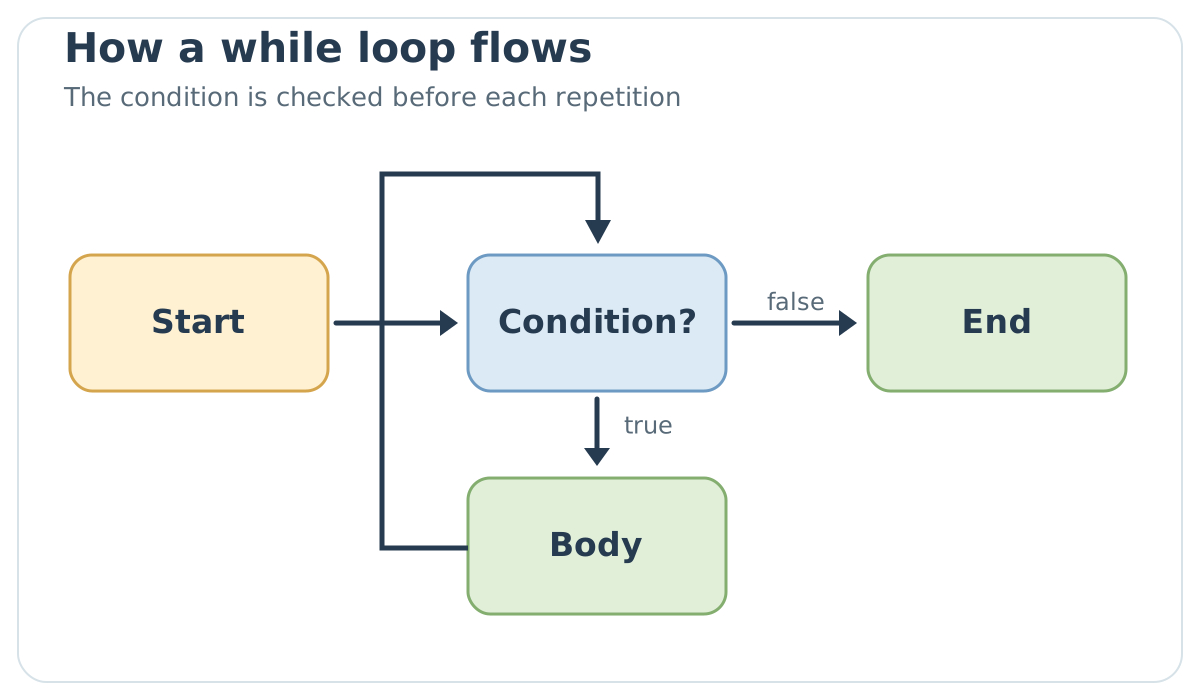
A while loop checks the condition before executing its body. If it is false from the outset, the body is never executed. The figure follows the condition's path and the return to the check after each repetition.
int index = 0;
while (index < grades.length) {
    System.out.println(grades[index]);
    index++;
}
index++ increases the index by one. If we forget to modify it, the condition can remain true forever; if we increase it before reading, we can skip the first grade. A loop should be read as three questions: what is the initial state, what ends repetition, and what changes at each step?
The do–while form checks the condition after the body, so executes it at least once. It is useful, for example, when requesting input and then deciding whether to repeat the request. Do not use it simply to avoid an initialization line: choosing it promises that the first execution makes sense even if the final condition is false.
To read a while loop reliably, identify a property that must remain true at every iteration. In the grades loop, before accessing grades[index], we want 0 <= index < grades.length. The index starts at zero, the condition checks the upper bound, and the increment happens after access: together, these three parts explain why we do not read outside the array. Swapping access and increment skips the first position and may attempt an invalid index on the last iteration. Trying an array with one element immediately makes the error visible.
An endless loop can be intentional, for example a service awaiting requests, but must have a strategy for interruption or shutdown. In teaching programs, the most common case is much simpler: the variable used in the condition is never updated. When a program seems stuck, first check whether the loop body actually modifies what could make the condition false. Temporarily printing the index can help, provided it is subsequently removed or replaced with a targeted check.
int attempts = 0;
do {
    attempts++;
    System.out.println("Attempt " + attempts);
} while (attempts < 3);
The program prints three lines. The body performs the first attempt before evaluating attempts < 3; after the third, the condition becomes false. A while can produce the same result with a different arrangement of the check, but does not guarantee a first execution when the initial condition is false.
for and Enhanced for
When we know an index starts at a value, continues while a condition is true, and changes at each step, a for brings the three elements together:
for (int index = 0; index < grades.length; index++) {
    System.out.println(grades[index]);
}
The index variable originates in the loop header. The condition index < grades.length avoids an out-of-range index. If we do not need the position and want only each value, enhanced for is more direct:
int sum = 0;
for (int grade : grades) {
    sum += grade;
}
Read this as “for each grade in grades.” The loop does not create a copy of the entire array: at each pass, it assigns the current element to the local variable. With primitive values, modifying grade does not modify the array element. Changing a specific position requires the index. Enhanced for also applies to iterable types, which we will encounter when discussing collections.
The two historical programs printing months showed the same sequence with ordinary for and enhanced for. On an array {"January", "February", "March"}, the first uses indexes 0, 1, and 2 to read values; the second directly delivers the month variable, one month at a time. If the task is printing all names, the second form avoids a counter that adds no information. If, instead, the task is writing “month 1: January” or replacing an element at a position, the index becomes useful again. This comparison, rather than a general promise of greater speed, is the selection criterion.
The enhanced for variable must be interpreted according to the element's type. With int[] grades, grade receives a copy of the primitive value: grade = 30; does not change the array. With an array of references to mutable objects, the variable receives a copy of the reference: reassigning it does not replace the array element, but calling a method that modifies the object can change the state observed through the array too. We do not yet need to use this second possibility; however, it prevents us from turning “enhanced for does not modify elements” into a false rule. Removal during collection traversal also depends on the collection type and its iterator: when we reach collections, we will distinguish reading, object modification, and structure modification.
Ordinary for can also be read as a while with initialization, checking, and updating gathered in the header. After initializing index, it evaluates the condition before the body; after the body, it performs the update and returns to the check. If the condition is false from the outset, the body does not start. This correspondence helps choose the form without attributing different powers to it: both can traverse an array, but for makes the counter more visible when the number of steps is determined by length.
With an array of arrays, the outer loop can traverse rows and the inner one positions of the current row. The correct bound for the second is cells[row].length, rather than necessarily cells[0].length: Java permits rows of different lengths. This is exactly what we will need for the draughts board. Chapter 4's figure was rectangular for clarity, but general code must not depend on that figure.
Let us reconstruct the trace of a nested while with two counters on a small case, so meaning is not lost in dozens of printed lines. If row starts at 0 and the outer loop continues while row < 2, while at each iteration column restarts from 0 and the inner loop continues while column < 3, the visited pairs are (0,0), (0,1), (0,2), (1,0), (1,1), and (1,2). The row does not change during the three inner steps; the column is reset when moving to the next row. Forgetting that reset would skip the entire second row. The draughts program applies the same reasoning with two for loops and eight positions per row.
A for can also have two counters in its header, such as for (int left = 0, right = 4; left < right; left++, right--). On a five-element array, it visits the index pairs (0,4) and (1,3), then stops when both reach 2. Commas separate the two declarations of the same type and the two update expressions; the middle condition remains one boolean expression. This is useful when an algorithm looks at both ends of a sequence simultaneously, for example to check whether a word reads the same in both directions. If two counters do not share such a clear relationship, moving them into separate statements avoids turning the loop header into a puzzle.
The form for (;;) omits initialization, condition, and update; since no false condition ends it, the loop continues until a break, return, or exceptional interruption changes the flow. It is legal, like while (true), but requires an obvious exit path. Omitting only the update and then forgetting to modify the counter in the body is instead a common error. for's flexibility does not automatically make it the best choice for every problem: for “repeat until an event arrives,” a while may express the intention more directly.
Here is the revised average program. The empty-array check occurs before division; the sum works with any positive length:
public class GradeAverageWithLoop {
    public static void main(String[] args) {
        int[] grades = {24, 27, 30};
        if (grades.length == 0) {
            System.out.println("No grades available");
            return;
        }

        int sum = 0;
        for (int grade : grades) {
            sum += grade;
        }
        double average = (double) sum / grades.length;
        System.out.println("Average: " + average);
    }
}
Here, return ends the main method when there are no grades. The normal case continues to printing. The output for the example's three grades is still Average: 27.0; adding a fourth grade does not require rewriting the sum.
Returning to the Draughts Board
In the arrays chapter, we left an eight-row, eight-column board unfinished. Usable cells alternate; we place white pieces in the first three rows, black ones in the last three. With two nested for loops, we can apply the same rule to each position rather than copy many similar assignments. The % operator tells us whether the sum of indexes is even or odd.
public class InitialDraughts {
    public static void main(String[] args) {
        String[][] cells = new String[8][8];
        int white = 0;
        int black = 0;

        for (int row = 0; row < cells.length; row++) {
            for (int column = 0; column < cells[row].length; column++) {
                boolean playable = (row + column) % 2 == 1;
                if (playable && row < 3) {
                    cells[row][column] = "white";
                    white++;
                } else if (playable && row >= 5) {
                    cells[row][column] = "black";
                    black++;
                }
            }
        }

        System.out.println("White: " + white + ", black: " + black);
    }
}
The two middle rows remain without pieces; unusable cells also remain null. The playable condition avoids placing a piece in every cell of the row. The expected result is White: 12, black: 12: three rows per color, four usable cells per row. This numerical check is small, but immediately reveals an error in the cells' parity or the boundary between rows.
break, continue, and return
break interrupts the loop or switch containing it in its permitted form. continue skips the rest of the current iteration and returns to the loop's check or update. return leaves the method and, if the method produces a result, returns that value. These are three different control transfers. Before using them, ask what should happen afterwards: ignore one element, end a search, or end the entire operation?
For example, during an array search, break can stop the loop as soon as we find the requested element. If, instead, we want to ignore negative values and continue summing subsequent ones, continue can express the choice, although an if sometimes makes the code simpler. Labels and interruptions of nested loops exist, but in a heavily nested program it is often clearer to extract a method with a meaningful name.
In the classic form of switch, break interrupts the switch; in a loop, it interrupts the innermost loop containing it. continue does not mean “move to the next case” of a switch: it concerns a loop and starts its next iteration according to its rules. return ends the current method, even if it appears inside a loop. Before using one of the three, mentally name the construct you want to leave. If the answer is vague, the line will be difficult to maintain.
Consider an example using continue to count even numbers from 0 to 20. It is worth checking boundaries, because a counter initialized to -1 and incremented at the start of the body first visits 0 and, on the last iteration, also 20: the even numbers counted are eleven, rather than ten. If we wanted the range from 1 to 20, it was better to start at 1 in a for with the condition number <= 20; the even numbers become ten. A description such as “between 1 and 20” must therefore specify whether endpoints are included and be reflected in the code. continue can skip the counter increment if placed incorrectly in a while, creating an endless loop; in a for, the header's update executes before the next check.
When a method is declared void, it can end with return; without a value, like main in the empty-array case. If the method promises a result, such as int findFirstNegative(int[] values), paths ending normally must return a compatible value: return index; when finding a position and return -1; at the end of the search. A break in place of that first return would leave only the loop and still require a statement to deliver the result to the caller. Distinguishing these two exit levels also simplifies error handling: an exception is not a generic replacement for break when we simply want to stop searching.
int nonnegativeSum = 0;
for (int number : new int[] {5, -2, 3}) {
    if (number < 0) {
        continue;
    }
    nonnegativeSum += number;
}
System.out.println("Nonnegative sum: " + nonnegativeSum);
The result is 8. When number equals -2, continue skips only that iteration's addition: the loop then moves to 3. It does not end the loop or leave the method. The fragment is executable in the support file ControlFragments.java.
int firstNegative = -1;
for (int index = 0; index < values.length; index++) {
    if (values[index] < 0) {
        firstNegative = index;
        break;
    }
}
Here, -1 means “no position found,” because valid indexes start at zero. As soon as the loop encounters a negative value, it retains the index and stops; if none is encountered, the initial value stays unchanged. If the loop were nested inside another, this break would stop only the loop directly containing it. To leave the whole method, we could design a search method using return, rather than depending on a hard-to-follow label.
Try It Yourself
Start with GradeAverageWithLoop and try three cases: three grades, four grades, and an empty array. Before executing the program, write what you expect. Work is complete when the empty case causes no division by zero, the other two calculate the correct average, and you can explain which statement prevents access to an out-of-range position. As a self-check, compare while and do–while: which can never execute its body, and why?