The project that works only on our computer
So far we have compiled many examples with a single javac line. It is a good way to see where source ends and the executable program begins. When the files become ten, resources and tests arrive, and a colleague must reconstruct the same result, that line no longer tells the whole story. Where do we put tests? Which Java version do we use? How do we obtain JUnit? What is in the JAR we deliver? If the answer is “it works on my computer”, the project cannot yet be handed on.
We build a small catalog with one title per line. The application reads a UTF-8 file, normalizes spaces and prints the titles. It is not a complete library system: behavior is deliberately small, so we can follow every step from repository to artifact. In chapter 25 we already tackled files, charsets and resources; here the question differs. We want a second person to start from version-controlled files, run checks and obtain a distributable program without guessing hidden instructions.
Definition – Reproducible build. In this chapter, “reproducible” means that source, configuration, declared versions, environment and commands allow expected behavior to be reconstructed and verified. We do not automatically promise identical bytes in every JAR: archive timestamps, plugins, operating system and other inputs can affect final bytes. If binary identity is a requirement, it must be designed and compared separately.
First separate what we write from what we generate
Figure 29.1 shows our example's path. Production sources are under src/main/java; tests under src/test/java; the demonstration file is in data/. Maven writes classes, reports and JARs into target/. That last folder is a result, rather than a source to correct manually. If we modify a .class or report inside target, the next build replaces it and no colleague will find the change in source.
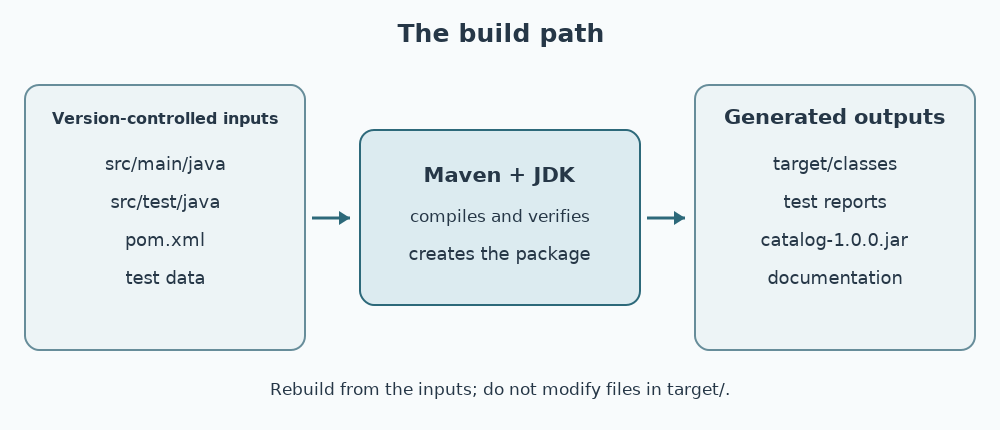
In the complete catalog project we find three production classes, two test classes, the demonstration file and pom.xml. A real project may have resources in src/main/resources and test data in src/test/resources; we do not create those empty directories merely to conform to a drawing. The important distinction is responsibility: a test can use JUnit without dragging JUnit into the distributed program, and a generated file is not mistaken for the source of truth.
catalog/
  pom.xml
  data/titles.txt
  src/main/java/example/catalog/
    Titles.java  TitleArchive.java  CatalogCli.java
  src/test/java/example/catalog/
    TitlesTest.java  TitleArchiveTest.java
  target/                 ← created by the build
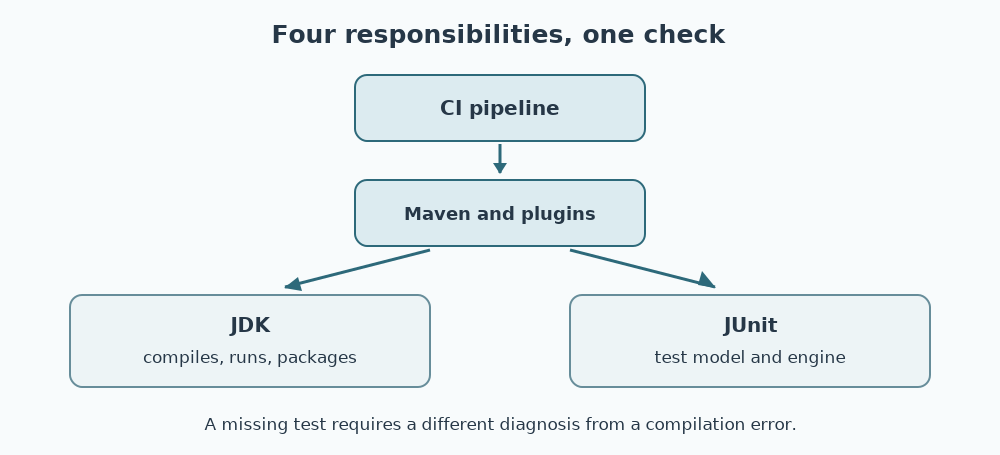
Key concept – Three levels. The JDK contains
javac,java,jar,javadoc,jdeps,jlinkand other tools. Maven is an external program organizing phases and dependencies, also calling JDK tools through plugins. JUnit is an external dependency offering the test model and engine to execute it. A continuous integration pipeline repeats commands in a declared environment. Figure 29.2 distinguishes these levels: a compilation error, failed test and missing artifact require different diagnoses.
Before Maven: compiling and understanding paths
The javac compiler reads .java files and produces .class files for the JVM. If we are in the catalog folder, we can isolate generated files with this command:
mkdir -p target/manual
javac --release 25 -Xlint:all -d target/manual \
  src/main/java/example/catalog/*.java
java -cp target/manual example.catalog.CatalogCli data/titles.txt
-d target/manual indicates where to put classes. Their internal path follows the example.catalog package: the compiler creates example/catalog under the output directory. -cp or --class-path tells the launcher where to look for application classes. --release 25 selects the language level, class format and APIs of the declared compilation release; it does not install Java 25 on another computer or by itself make third-party libraries available. -Xlint:all makes useful warning categories visible, to read and correct or explain. A build suppressing every warning to obtain a clean screen loses information.
In chapter 6 we saw the module path. Our example stays on the class path to make the initial build path transparent; the resulting JAR is not a named module. If a project declares module-info.java, compilation, module resolution and the launch command change: requires and exports must be designed, rather than adding --module-path randomly. jlink, which we will use later, can create a runtime for this class-path application too by choosing the necessary JDK modules; this does not turn the JAR into a modular JAR.
The expected execution prints Titles read: 2, then Modern Java and It is time to learn — café. The second title verifies that reading really is UTF-8 in the test case, but one positive file does not prove that any input is acceptable. In chapter 30 we will return precisely to the boundary of untrusted data.
The case study's three classes
The first class, Titles, represents a small but verifiable domain rule. It receives a string, removes spaces at the edges, reduces internal sequences of spaces and rejects an empty title or one exceeding eighty Java char units. The limit is a teaching rule, rather than a universal standard for book titles. String.length() counts UTF-16 units, not necessarily characters perceived by a person: if the domain requires another criterion, the test and rule must change it explicitly.
package example.catalog;

import java.util.Objects;

/** Teaching rules for titles in the small catalog. */
public final class Titles {
    private Titles() {
    }

    /**
     * Removes spaces at the edges and reduces internal space sequences.
     *
     * @param input title to normalize
     * @return nonempty title at most 80 Java characters long
     * @throws NullPointerException if input is null
     * @throws IllegalArgumentException if the title is empty or too long
     */
    public static String normalize(String input) {
        Objects.requireNonNull(input, "input");
        String title = input.strip().replaceAll("\\s+", " ");
        if (title.isEmpty() || title.length() > 80) {
            throw new IllegalArgumentException("Empty or excessively long title");
        }
        return title;
    }
}
Objects.requireNonNull distinguishes null from an empty string. strip() removes spaces at the edges according to the method's Unicode rules; replaceAll("\\s+", " ") instead follows the definition of \s in the Java regular expression used here. This line does not promise to normalize every form of Unicode whitespace identically: if the catalog receives complex international data, specify accepted characters and add examples. The method's Javadoc documents the public contract and exceptions, so a rule change can be recognized in tests and generated documentation.
The second class, TitleArchive, connects that rule to the file. Files.lines returns a stream using a resource that must be closed: try-with-resources closes it even if a line causes an exception. Blank lines are skipped, the others go through Titles.normalize. The result is an unmodifiable copy of the collected list; this does not mean the original file cannot change after reading.
package example.catalog;

import java.io.IOException;
import java.nio.charset.StandardCharsets;
import java.nio.file.Files;
import java.nio.file.Path;
import java.util.ArrayList;
import java.util.List;

/** Reads a teaching archive with one title per line. */
public final class TitleArchive {
    private TitleArchive() {
    }

    /**
     * Returns nonempty titles in file order.
     *
     * @param path UTF-8 file with one title per line
     * @return unmodifiable list of normalized titles
     * @throws IOException if reading fails
     */
    public static List<String> read(Path path) throws IOException {
        List<String> titles = new ArrayList<>();
        try (var lines = Files.lines(path, StandardCharsets.UTF_8)) {
            for (String line : (Iterable<String>) lines::iterator) {
                if (!line.isBlank()) {
                    titles.add(Titles.normalize(line));
                }
            }
        }
        return List.copyOf(titles);
    }
}
The loop uses an Iterable adaptation to traverse the stream inside the block closing it. This is a local choice of the example: a project could use a Stream pipeline, provided resource handling remains visible. This version accumulates all titles in memory and imposes no limit on the number of lines or the size of a read line. It is fine for a controlled demonstration file; it is not yet a safe importer for arbitrary files. Chapter 30 will show how to change the requirement without pretending that a green build equals a security check.
The third class, CatalogCli, is the entry point. It receives the file path as an argument, calls the import and prints the result. Choosing to require exactly one argument makes the test repeatable. An application for end users should translate an input or reading error into an appropriate message and exit code; here we leave visible the distinction between build failure and runtime failure.
package example.catalog;

import java.io.IOException;
import java.nio.file.Path;

/** Entry point for the build and distribution example. */
public final class CatalogCli {
    private CatalogCli() {
    }

    /**
     * Reads and prints titles from the specified file.
     *
     * @param args one file path
     * @throws IOException if reading fails
     */
    public static void main(String[] args) throws IOException {
        if (args.length != 1) {
            throw new IllegalArgumentException("Usage: CatalogCli <titles-file>");
        }
        var titles = TitleArchive.read(Path.of(args[0]));
        System.out.println("Titles read: " + titles.size());
        for (String title : titles) {
            System.out.println(title);
        }
    }
}
Why introduce Maven
We have just compiled three files manually. We could do the same with tests, but would have to find JUnit, include each of its JARs and launch the correct engine. Then we would have to repeat consistent commands for documentation, packaging and analysis. A build system records this sequence. Maven uses a project file called a POM, pom.xml, describing coordinates, dependencies, plugins and configuration. The coordinates groupId:artifactId:version identify our artifact; in the case study they are example:catalog:1.0.0.
In the complete POM, we fix the compiler release at 25, JUnit 5.14.1 for tests only, and the versions of the plugins we need. Declaring versions is part of repeatability: relying on implicit versions from the computer or parent POM may change behavior when that environment changes. The file does not hide that Maven and JUnit are tools external to Java SE.
<project xmlns="http://maven.apache.org/POM/4.0.0"
         xmlns:xsi="http://www.w3.org/2001/XMLSchema-instance"
         xsi:schemaLocation="http://maven.apache.org/POM/4.0.0
                      https://maven.apache.org/xsd/maven-4.0.0.xsd">
    <modelVersion>4.0.0</modelVersion>
    <groupId>example</groupId>
    <artifactId>catalog</artifactId>
    <version>1.0.0</version>
    <properties>
        <project.build.sourceEncoding>UTF-8</project.build.sourceEncoding>
        <maven.compiler.release>25</maven.compiler.release>
        <junit.version>5.14.1</junit.version>
    </properties>
    <dependencies>
        <dependency>
            <groupId>org.junit.jupiter</groupId>
            <artifactId>junit-jupiter</artifactId>
            <version>${junit.version}</version>
            <scope>test</scope>
        </dependency>
    </dependencies>
    <build>
        <plugins>
            <plugin>
                <groupId>org.apache.maven.plugins</groupId>
                <artifactId>maven-compiler-plugin</artifactId>
                <version>3.14.1</version>
            </plugin>
            <plugin>
                <groupId>org.apache.maven.plugins</groupId>
                <artifactId>maven-surefire-plugin</artifactId>
                <version>3.5.4</version>
            </plugin>
            <plugin>
                <groupId>org.apache.maven.plugins</groupId>
                <artifactId>maven-jar-plugin</artifactId>
                <version>3.4.2</version>
                <configuration>
                    <archive>
                        <manifest>
                            <mainClass>example.catalog.CatalogCli</mainClass>
                        </manifest>
                    </archive>
                </configuration>
            </plugin>
        </plugins>
    </build>
</project>
<scope>test</scope> prevents JUnit from becoming an ordinary dependency of the running application. The compiler plugin uses --release 25; Surefire discovers and executes Jupiter tests; the JAR plugin writes the main class into the manifest. If a test does not appear in the report, the problem is not solved by merely counting BUILD SUCCESS lines: naming conventions, test engine and executed-test report must be checked. In our case, the build reports five test invocations. On a machine without dependencies in the Maven cache, the first build must reach an authorized repository or company mirror; the -o option used in local verification works only because the artifacts are already present.
mvn clean verify asks first to remove previous output and then traverses the required phases up to verify. Maven executes goals associated with phases according to the POM and packaging type. The word verify does not magically add integration tests or security checks: it runs them only if configured in the life cycle. mvn test stops the path at tests; mvn package builds the JAR; mvn install copies the artifact into the computer's local repository. deploy sends it to a configured remote repository: it is not synonymous with “run the application”. For a clean test of the project, use from its folder:
mvn clean verify
java -jar target/catalog-1.0.0.jar data/titles.txt
Further reading – Maven and Gradle solve the same organizational need. Gradle describes tasks and dependencies using a different model, while Maven has conventions and phases declared in the POM. This volume uses Maven as one reproducible path, so code, tests and output remain verifiable with a single configuration. Gradle users must translate requirements rather than literally copy Maven phases: Java 25 release, test separation, fixed versions, launchable JAR and a clean-environment test remain the same objectives. The tool wrapper and verification of distributions are parts of the project when adopting Gradle.
A dependency often arrives with other dependencies
JUnit appears in the POM as a direct dependency. Its components may bring other transitive libraries: Maven reads dependency POMs and builds a graph. If two branches request different versions of the same library, version mediation may choose a result the reader did not expect. Therefore “I declared only one library” does not mean “the project uses only one external artifact”. mvn dependency:tree is the first way to observe the graph when the necessary plugin is available; also record repositories, resolved versions and update policy. An incorrect scope may leave a library the program uses out of runtime, or bring a test-only library into the package.
Resolution is not a trust guarantee. A repository may be unavailable; an artifact may be replaced or compromised; a fixed version may contain a known vulnerability. For a professional build, fix origin and integrity according to available tools, retain a dependency inventory and reassess updates. Chapter 30 will return to the supply chain as a security and maintenance problem. Here we only need to learn to read the POM as part of project code, rather than an administrative file to leave to whoever “takes care of the build”.
Testing behavior, rather than merely executing methods
JUnit is not included in the JDK. We use it because it describes cases and expected results in an executable, readable format. The Titles test covers two positive inputs with a parameterized test and two negative boundaries. @CsvSource supplies input–expected pairs; @Test marks the other cases; assertThrows verifies rejection of an empty title or one 81 units long. Repeating positive cases shows that the same rule transfers to different strings, rather than inflating test counts.
package example.catalog;

import static org.junit.jupiter.api.Assertions.assertEquals;
import static org.junit.jupiter.api.Assertions.assertThrows;

import org.junit.jupiter.api.Test;
import org.junit.jupiter.params.ParameterizedTest;
import org.junit.jupiter.params.provider.CsvSource;

class TitlesTest {
    @ParameterizedTest
    @CsvSource({"'  Modern   Java  ', 'Modern Java'",
                "'The brick', 'The brick'"})
    void normalizesSpaces(String input, String expected) {
        assertEquals(expected, Titles.normalize(input));
    }

    @Test
    void rejectsEmptyTitle() {
        assertThrows(IllegalArgumentException.class,
                () -> Titles.normalize("   "));
    }

    @Test
    void rejectsExcessivelyLongTitle() {
        assertThrows(IllegalArgumentException.class,
                () -> Titles.normalize("a".repeat(81)));
    }
}
The TitleArchive test uses @TempDir. JUnit creates a test directory, and the test writes a UTF-8 file there: it does not depend on a personal path, a file left by a previous execution or test order. Here file system, decoding, line filtering and normalization are exercised together. It is closer to an integration test between local components than the pure Titles tests, while remaining small and fast. The word “integration” does not automatically require a database or remote server.
package example.catalog;

import static org.junit.jupiter.api.Assertions.assertEquals;

import java.io.IOException;
import java.nio.charset.StandardCharsets;
import java.nio.file.Files;
import java.nio.file.Path;
import java.util.List;
import org.junit.jupiter.api.Test;
import org.junit.jupiter.api.io.TempDir;

class TitleArchiveTest {
    @TempDir Path folder;

    @Test
    void readsNonemptyLinesInUtf8() throws IOException {
        Path file = folder.resolve("titles.txt");
        Files.writeString(file, "  Modern  Java  \n\nIt is time to learn — café\n",
                StandardCharsets.UTF_8);
        assertEquals(List.of("Modern Java", "It is time to learn — café"),
                TitleArchive.read(file));
    }
}
A unit test answers a narrow question: for this input, does the function produce the agreed result or error? An integration test checks that several parts cooperate. A system test starts the JAR as a user will and verifies manifest, class path and a real file. In our case, java -jar ... data/titles.txt is precisely that smoke test: if it fails, green unit tests do not save the artifact. A robust pipeline runs checks at levels matching risks, rather than turning the “test pyramid” into a law about exact counts per category.
For deterministic tests, time must be introduced through Clock, as in C26, rather than reading Instant.now() at the heart of a rule. Temporary files must be created and cleaned up by the test. C27's network tests use controlled local servers, rather than a public site that may change or be unreachable. Concurrency in C20 and C20A requires invariant checks, rather than comparisons against the printing order of different threads. This does not eliminate intermittent defects, but avoids adding artificial instability to tests.
Key concept – Coverage is not correctness. A percentage of executed lines tells us which parts of code a test passed through. It does not tell us whether the assertion would recognize an incorrect result, whether a boundary was tested or whether the requirement was correct. If a test calls
normalize("Java")without comparing the result, it may increase coverage while checking almost nothing. A useful way to judge the test is to ask which defective change would make it fail. Mutation testing can automate part of this experiment, but even killed mutants do not replace choosing requirements to verify.
From compiled code to the JAR
A JAR is an archive containing classes and resources with a defined structure. jar --list --file target/catalog-1.0.0.jar shows the program's three classes, manifest and Maven metadata. Tests are not in the ordinary JAR because they are in test output. In the manifest, Main-Class indicates example.catalog.CatalogCli: this allows java -jar. Without that entry, a JAR may be valid as a library yet fail to start with that command. Figure 29.3 distinguishes three often-confused results: JAR, runtime image and application package.
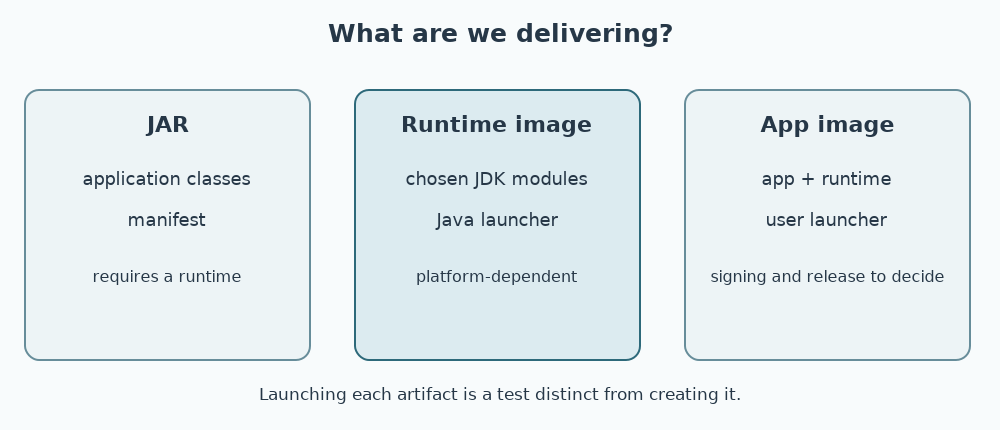
The example's JAR contains no JUnit and is not a fat JAR incorporating every external dependency. It can start by itself because the production program uses only JDK APIs. If we added a production library, we would have to choose how to distribute it: a class path beside the JAR, application layout, module or package including it. The manifest does not download dependencies at startup. Examining artifact contents is therefore a check, rather than a curiosity.
Documentation and JDK analysis tools
The Javadoc of Titles.normalize declares input, return value and errors. javadoc can generate HTML pages from /** ... */ comments; a comment repeating the method name without explaining the contract does not help. javadoc -d target/docs src/main/java/example/catalog/*.java produces documentation in a generated folder. Documentation verification must check warnings and links, as well as read the produced page: an existing HTML page may still describe an obsolete rule. javap -c -p -classpath target/classes example.catalog.Titles shows bytecode and members of the compiled class; it does not replace reading source, but helps understand what reached the artifact.
jdeps --print-module-deps target/catalog-1.0.0.jar reports java.base for this case. It analyzes statically observable dependencies on platform modules. It cannot always infer a plugin loaded by name, a class sought through configuration or a native library opened later. jdeprscan --release 25 target/catalog-1.0.0.jar looks for deprecated API usage in bytecode according to the chosen release; absence of lines in our case does not prove absence of every migration problem. When an analysis produces a result, connect it to the code line or dependency causing it, rather than using warning counts as the sole indicator.
jshell is useful for trying a call or hypothesis with immediate feedback. A debugger allows stopping on a line and observing values and stack; jdb is the JDK's command-line interface, while IDEs offer more convenient views. Neither replaces a test to retain: an interactive experiment becomes project knowledge when we turn the observation into a repeatable case. In chapter 30 we will use jcmd and Java Flight Recorder to diagnose an already running process; there too, the question precedes the command.
A runtime for the program
A machine receiving only the JAR still needs a compatible Java runtime. jlink builds a runtime image from chosen JDK modules. In our case, jdeps indicates java.base, and the program loads no other modules dynamically. From the catalog folder, try:
jlink --add-modules java.base --output target/runtime
target/runtime/bin/java -jar target/catalog-1.0.0.jar data/titles.txt
The second line is the decisive test: it is not enough for jlink to create a directory. An application using reflection, service providers, particular charsets or dynamically loaded features may require modules that jdeps does not see in the static path. The runtime must be tested with real use cases in a clean environment and on the target platform. A runtime image created for macOS is not automatically a runtime for Windows or Linux: JDK binaries depend on the platform.
jpackage can combine the application and a runtime into an application image or an installable format supported by the operating system. On the Mac used for the book's verification, the following command produced an app image and its launcher executed the test file:
jpackage --type app-image --name TeachingCatalog \
  --input target --main-jar catalog-1.0.0.jar \
  --runtime-image target/runtime --dest target/package
The launcher's location and package format change with the operating system. To distribute to others, beyond launching the program, we must decide version, signing, provenance, licenses, updates and removal. A local app image is not equivalent to a signed installer verified on every platform. The command shows the technical step, rather than replacing a release policy.
The check a colleague can repeat
Continuous integration means having a machine repeat the project's defined checks for every proposed change. For our catalog, a minimal pipeline checks out the repository, selects JDK 25, runs mvn -B clean verify, retains test reports and JAR, then performs an artifact launch test. -B requests a mode suitable for a noninteractive environment; it does not change test semantics. The job must know where JDK, Maven and dependencies come from, and which network or cache environment it uses. If the local build works only thanks to a manually installed file, the pipeline reveals a missing input.
| Step | Observable evidence | Question if it fails |
|---|---|---|
| Compilation | Classes and declared warnings | Which source or API does not match Java 25? |
| Tests | Case counts, errors, reports | Is the rule wrong or does the test depend on the environment? |
| Packaging | Inspected JAR and manifest | Are the main class and dependencies present? |
| Launch | JAR and runtime image output | Does the program start without the development environment? |
| Analysis | Modules, deprecations, dependencies | Which risk is real and where must it be corrected? |
Checking must not stop at BUILD SUCCESS: if Surefire runs zero tests, the requirement “tests executed” is not met. Likewise, a build may succeed while producing an unlaunchable JAR or a program unable to find a file in the package. This is why the case study has several tests, each tied to a precise promise. The chapter 29 activities ask you to introduce one defect at a time and identify the step in which it should emerge.
Transferring the method
Imagine replacing the local file with an HTTP client from chapter 27. Domain code stays in src/main/java, but a test using a network response must control a local server and its timing. The runtime might require different modules; the package should retain configuration and certificates appropriately. Or imagine turning the catalog into a named module: pom.xml, the JAR and the launch command should reflect module-info.java. In both cases we do not blindly copy the chapter's final command: we reconstruct the graph of inputs, tests and outputs the other programmer must be able to follow.
The closing question is simple: which files and instructions are needed to reconstruct the behavior we promised? If we cannot answer by looking at repository, POM, tests and build report, a brick is still missing. C30 starts from here: a repeatable build gives us a reliable foundation for finding defects, protecting boundaries and observing the program while it works.
Essential references
Essential reference – Tools and libraries. Oracle's specifications for
javac,jar,javadoc,jdeps,jdeprscan,jlinkandjpackagedefine commands used in JDK 25. Apache Maven documents the build life cycle and dependency resolution. The JUnit 5.14.1 guide documents the project's parameterized tests. These sources specify tool contracts; the case study's commands were verified in the declared environment and must be tested again on the distribution platform.